
Automate Every Thank-You with Dynamic Emails and Text Messages
Learn how GivingFuel Dynamic Emails and Text Messages help nonprofits send timely, personalized donor thank-yous after someone gives.

Key Takeaways
• Automated thank-yous help nonprofits respond quickly after someone gives.
• GivingFuel Dynamic Emails can send customized follow-up emails after completed donations.
• GivingFuel Dynamic Text Messages can send timely SMS messages after a donor gives, with an SMS plan.
• Personalized thank-you messages can help donors feel seen, appreciated, and connected to the mission.
• Automated follow-up helps nonprofits create a better donor experience with less manual work.
The moments after a donation matter.
A donor just chose to support your mission. They acted with generosity, trust, and care. What happens next can shape how they feel about that gift and whether they stay connected.
But when your team is busy, sending the right thank-you at the right time can be hard to manage manually. A first-time donor needs a warm welcome. A recurring donor may need a different message. A campaign donor may need a reminder of the impact they just helped create.
That is where GivingFuel’s Dynamic Emails and Dynamic Text Messages can help.
This is the next post in our GivingFuel CRM series. We have covered contact profiles, tags and search filters, merging duplicate contacts, recording every donation in one place, and donor email and text messaging. Now, we are looking at how automated thank-you messages help nonprofits follow up after a gift without adding more work for the team.
What Are Automated Donor Thank-Yous?
Automated donor thank-yous are follow-up messages that send after someone makes a donation.
Instead of manually writing every thank-you email or text, your team can create messages ahead of time and schedule them to send after a gift is made.
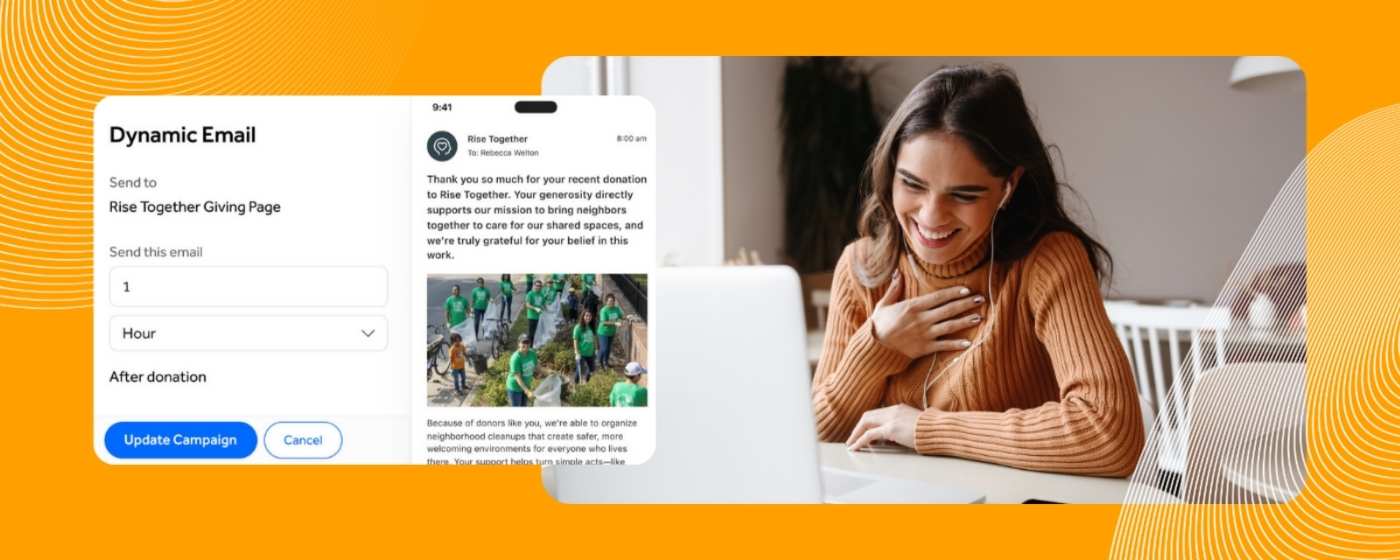
With GivingFuel’s Dynamic Emails, nonprofits can automatically send customized follow-up emails at set intervals after donors give. These messages can help your team thank donors, share next steps, and keep supporters connected after the donation.
GivingFuel also supports Dynamic SMS Text Messages, which can automatically send a text message after someone donates on a giving page.
The goal is simple: make sure donors hear from you while their gift is still top-of-mind.
Why Thank-Yous Matter After a Donation
When a donor makes a donation, that shouldn’t be the end of the relationship. Rather, it should feel like the beginning of a deeper connection.
A thoughtful thank-you helps donors know their gift was received, appreciated, and connected to real impact. It also gives your nonprofit a natural way to keep the conversation going.
Automated thank-yous can help your team:
• Thank donors quickly after they give.
• Share a warm message without starting from scratch.
• Connect the gift back to your mission.
• Welcome recurring donors into ongoing support.
• Share next steps, updates, or ways to stay involved.
• Reduce manual follow-up during busy campaigns.
A good thank-you does not need to be long and drawn out. It just needs to be timely, clear, and human.
How GivingFuel Dynamic Emails Work
Dynamic Emails help your nonprofit send follow-up emails after a donor gives through a GivingFuel page.
Your team can choose the giving page, write the message, set the subject line, add the from name and reply-to email, review the email, and schedule when it should send after the donation.
You can set the timing based on how much time should pass after the gift, such as a certain number of minutes, hours, or days.
GivingFuel Dynamic Emails can also include name variables, such as first name, last name, or full name, with fallback text if a name is not available.
That helps the message feel more personal without requiring your team to manually edit every email.
With Dynamic Emails, your team can:
• Send a thank-you after a donation.
• Create follow-up messages for specific GivingFuel pages.
• Schedule messages after the gift is made.
• Add name variables when available.
• Send test emails before turning messages on.
• Manage, edit, duplicate, view, or deactivate Dynamic Emails.
Dynamic Emails only send for donations with a completed status, so they are tied to gifts that have actually gone through.
How Dynamic Text Messages Help
Depending on the situation, some donor follow-up works best by text.
Text messages can be especially helpful when the message is short, timely, and easy to read from a phone. A donor may not check email right away, but a brief text can help them feel acknowledged quickly.
With GivingFuel’s Dynamic SMS Text Messages, your team can send a text message after someone donates on a GivingFuel page.
You can use Dynamic Text Messages to:
• Send a quick thank-you after a gift.
• Reach donors on the same device they may have used to give.
• Schedule messages minutes or hours after the donation.
• Share a short impact note or next step.
• Send a test message before scheduling.
Dynamic SMS Text Messages can also use first name, last name, or full name variables, with fallback text when a name is not available.
What to Include in an Automated Thank-You
Just because the message is automated, doesn’t mean it has to sound robotic. Your thank-yous should still be personal.
The best thank-you messages are short, warm, and specific. They remind the donor that their gift matters and make the next step clear.
A strong thank-you can include:
• A genuine expression of gratitude.
• A simple reminder of what the gift supports.
• A next step, if relevant.
• A campaign update or impact note.
• A recurring donor welcome message, when appropriate.
• A reply-to email so donors know how to reach your team.
For example:
“Thank you for your generous gift. Your support helps us continue this work and serve more people in our community. We’re grateful to have you with us.”
Nothing complicated. A clear thank-you sent at the right time can go a long way.
When to Use Automated Thank-Yous
Automated thank-yous can support everyday giving and campaign-specific outreach.
You might use them for:
• General donations
• Recurring giving
• Giving Tuesday campaigns
• Event fundraising
• Matching gift campaigns
• Program-specific donation pages
• Urgent fundraising appeals
For a general giving page, you may want a simple thank-you that works year-round. For a campaign page, you may want a message that references the specific goal, deadline, or impact.
GivingFuel’s donation page tools make it easier to create giving pages for different campaigns, while Dynamic Emails and Dynamic Text Messages help your team follow up after donors give.
Automated Thank-Yous vs. General Email and Text Campaigns
Automated thank-yous are different from general donor communication.
An Email Blast or Text Message Blast is usually sent to a group of supporters at once. A Dynamic Email or Dynamic Text Message is sent because someone took a specific action: they gave.
That makes the message more timely.
Use general campaigns when you want to send a newsletter, campaign announcement, event reminder, or broad update.
Use automated thank-yous when you want to respond after a donation and keep the donor experience moving forward.
GivingFuel’s donor engagement tools help nonprofits use email and text messages for both campaign communication and donor follow-up.
Best Practices for Automated Thank-Yous
Use these simple habits to keep automated thank-yous helpful and human:
• Lead with gratitude.
• Keep the message short and clear.
• Tie the gift back to impact.
• Send the message while the gift is still fresh.
• Test emails and texts before scheduling.
• Keep text messages brief and easy to read.
• Use a reply-to email your team actually checks.
• Update campaign-specific messages when the campaign changes.
A thank-you should feel like a real moment of appreciation, because that’s exactly what it is.
FAQs
What is an automated donor thank-you?
An automated donor thank-you is an email or text message that sends after someone makes a donation, helping your nonprofit respond quickly without manually writing every message.
What are GivingFuel Dynamic Emails?
GivingFuel Dynamic Emails are customized follow-up emails that can automatically send at set intervals after donors give to your organization.
Can GivingFuel personalize Dynamic Emails?
Yes. GivingFuel Dynamic Emails can use first name, last name, or full name variables, with fallback text if a contact does not have a name available.
What are GivingFuel Dynamic Text Messages?
GivingFuel Dynamic Text Messages are SMS messages that can automatically send after someone donates on a GivingFuel page.
How do automated thank-yous help nonprofits?
Automated thank-yous help nonprofits respond faster, reduce manual follow-up, and create a more thoughtful donor experience after someone gives.
Make Every Thank-You Easier to Send
Every gift deserves a thoughtful thank-you.
GivingFuel’s Dynamic Emails and Dynamic Text Messages help nonprofits send timely follow-up after donors give, without adding more manual work for the team.
That means your supporters can feel appreciated right away, and your team can spend more time building relationships with the people who believe in your mission.
Ready to make donor follow-up easier? Sign up with GivingFuel today.
We’re here to help make donor management simpler, more connected, and easier to manage.
– The GivingFuel Team

The world's #1 All-in-one fundraising, engagement, CRM, and marketing platform for nonprofits. GivingFuel helps you do more, raise more and keep more.
Help & Support: team@givingfuel.com
Sales: sales@givingfuel.com
© 2026 Giving Fuel. All rights reserved.
We, like the rest of the internet, use cookies and similar technologies, including third-party analytics and reporting tools, to operate our site, and analyze usage and performance. These tools may collect information such as pages visited, interactions, device/browser details, and identifiers. But we do not sell or share your information with third-parties.
You probably won't read this nor our policies, but we are required by law (and legal trolls who ruin everything) to show you this popup before you proceed. By continuing to use our site, you acknowledge and agree to this use of cookies and technologies as described in our Privacy Policy and Terms and Conditions