
Recover More Donations with Winback Emails
Learn how GivingFuel Winback Emails help nonprofits follow up with supporters who start a donation but do not finish.

Key Takeaways
• Winback Emails help nonprofits follow up with supporters who start a donation but leave before finishing.
• GivingFuel can automatically send Winback Emails after a donation is abandoned, as long as the donor entered a billing email.
• A thoughtful reminder gives donors a simple way to return and complete the gift they already intended to make.
• Winback Emails can be customized, scheduled, tested, managed, and tracked from inside GivingFuel.
• Recovering abandoned donations can help nonprofits raise more without adding more manual follow-up for the team.
Not every donor finishes their gift the first time.
Sometimes they get distracted. Sometimes they need to find their wallet. Sometimes a donation page gets opened during a busy workday, in the middle of an event, or while someone is scrolling on their phone.
But it’s important to remember that an incomplete donation doesn’t necessarily mean someone changed their mind. It may simply mean they need an easy way to come back.
That is where GivingFuel Winback Emails can help.
This is the next post in our GivingFuel CRM series. We have covered contact profiles, tags and search filters, merging duplicate contacts, recording every donation in one place, donor email and text messaging, and automated thank-you messages. Now, we are looking at how Winback Emails help nonprofits reconnect with supporters who started to give but did not complete their donation.
What Are Winback Emails?
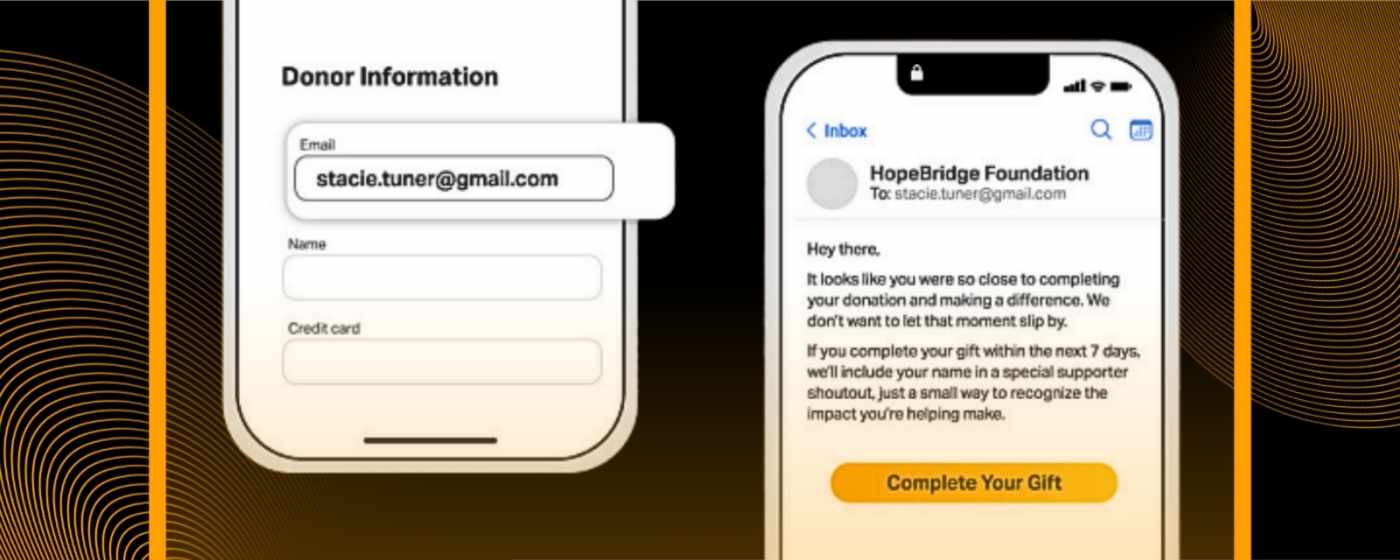
Winback Emails are automated follow-up emails sent to supporters who begin a donation but do not complete it.
In GivingFuel, a donation is marked as abandoned when it remains inactive for 20 minutes. Once the donation is abandoned, GivingFuel can save the billing email as a lead and send a Winback Email if the feature is turned on.
This allows your team to easily reconnect with someone who already showed intent to give.
This is different from a general fundraising email. A Winback Email is sent because someone started the donation process and left before finishing. It’s a timely reminder with a clear next step: come back and complete the gift.
Why Abandoned Donations Matter
Abandoned donations are easy to overlook because they are not completed gifts yet. But they are still very important.
A supporter clicked your campaign link. They opened your donation page. They started filling out the form. At that point, it’s clear that there was already interest and intent.
But without a thoughtful follow-up, that potential gift may disappear.
Winback Emails help your nonprofit:
• Remind supporters to complete a gift.
• Reconnect with donors who already showed interest.
• Follow up while the campaign is still fresh.
• Reduce manual reminder emails for your team.
• Track how many donors return after receiving the email.
The purpose of Winback Email is not to pressure people but rather make it easier for generous people to finish what they started.
How GivingFuel Winback Emails Work
With GivingFuel, Winback Emails can automatically follow up after someone abandons a donation.
Your team can write the message, choose the timing, review the email, and schedule it. GivingFuel also checks whether the donation is still abandoned before sending. If the donor completes the gift using the same billing email before the Winback Email is scheduled to send, GivingFuel will not send the email.
That helps prevent unnecesary follow-up after someone already completed their gift.
With Winback Emails, your team can:
• Set the subject line.
• Choose the from name and reply-to email.
• Write a custom message.
• Schedule when the email should send.
• Send a test email.
• Turn Winback Emails on or off.
• View recipients, clicks, donors, and donations tied to the email.
What to Include in a Winback Email
A good Winback Email should feel genuinely helpful and clear.
The donor already started the process, so there’s no need to make a long pitch. Remind them what their gift supports, make the next step obvious, and keep the message warm.
A simple Winback Email can include:
• A quick reminder about the mission.
• A clear link back to complete the donation.
• One sentence about the impact of the gift.
• A timely reason to return, if the campaign has a deadline.
• A warm, grateful tone.
For example:
“Hi there, it looks like you started a gift but did not get a chance to finish. Your support can still make a difference. Click below to return to the donation page and complete your gift when you are ready.”
Keep it simple. The goal is to help the donor make it to the finish line.
When to Use Winback Emails
Winback Emails can be especially useful during campaigns where timing matters.
You might use them for:
• Giving Tuesday campaigns.
• Year-end fundraising.
• Event fundraising.
• Matching gift campaigns.
• Urgent needs or short-term appeals.
• Recurring giving campaigns.
They can also support everyday donation pages, especially if your nonprofit receives steady traffic from email, social media, paid ads, QR codes, or partner promotions.
If your team is driving people to a GivingFuel donation page, Winback Emails give you another way to help more supporters finish the giving process.
How Winback Emails Support Better Donor Follow-Up
Winback Emails are part of a bigger donor follow-up system.
They help your team respond to a specific moment: someone started a gift and did not finish. Instead of hoping they come back later, GivingFuel can help you follow up automatically.
That matters because donor communication works best when it is timely.
GivingFuel’s Donor CRM & Relationship Management helps nonprofits keep donor activity, contact records, tasks, notes, and giving history organized in one place. Winback Emails add another layer by helping teams follow up with supporters who showed giving intent before completing a gift.
The result is a smoother donor experience and less manual work for your team.
Best Practices for Winback Emails
Use these simple habits to make Winback Emails more effective:
• Send the reminder while the donation is still fresh.
• Keep the message warm and helpful.
• Remind donors what their gift supports.
• Make the return link easy to find.
• Send a test email before turning it on.
• Review clicks, donors, and donations tied to the email.
• Update the message for major campaigns or deadlines.
Small changes can make the reminder feel more personal and less generic.
FAQs
What is a Winback Email?
A Winback Email is an automated follow-up email sent to a supporter who starts a donation but does not complete it.
Will every abandoned donor receive a Winback Email?
No. GivingFuel only sends Winback Emails when the donor entered a billing email before abandoning the donation.
Can GivingFuel send more than one Winback Email?
Yes. You can create multiple Winback Emails for a GivingFuel campaign. GivingFuel checks whether the donation is still abandoned before sending each scheduled email.
How do Winback Emails help nonprofits?
Winback Emails help nonprofits reconnect with supporters who already started a donation, giving them a simple path back to complete their gift.
Recover More Donations with GivingFuel
A started, but incomplete donation is still a valuable opportunity.
GivingFuel Winback Emails help nonprofits follow up with supporters who began a gift but did not finish, without adding more manual work for the team.
That gives your nonprofit another way to recover potential donations, support campaign momentum, and make giving easier for donors who already wanted to help.
Ready to recover more donations with GivingFuel? Sign up with GivingFuel today.
We’re here to help make donor management simpler, more connected, and easier to manage.
– The GivingFuel Team

The world's #1 All-in-one fundraising, engagement, CRM, and marketing platform for nonprofits. GivingFuel helps you do more, raise more and keep more.
Help & Support: team@givingfuel.com
Sales: sales@givingfuel.com
© 2026 Giving Fuel. All rights reserved.
We, like the rest of the internet, use cookies and similar technologies, including third-party analytics and reporting tools, to operate our site, and analyze usage and performance. These tools may collect information such as pages visited, interactions, device/browser details, and identifiers. But we do not sell or share your information with third-parties.
You probably won't read this nor our policies, but we are required by law (and legal trolls who ruin everything) to show you this popup before you proceed. By continuing to use our site, you acknowledge and agree to this use of cookies and technologies as described in our Privacy Policy and Terms and Conditions